Pumpkin Season Canva Frame Template: Autumn Aesthetics Made Easy
There’s a particular feeling that hits as soon as the air turns crisp and the leaves start to change. For designers and content creators, that shift signals a massive visual overhaul. Suddenly, everything needs to be warmer, cozier, and infused with that rich autumn palette. If you’ve been looking for a way to streamline your seasonal content creation without spending hours masking images or wrestling with complex software, the Pumpkin Season Canva Frame Template is a tool you need in your kit.
Understanding the Asset: More Than Just a Border
It is important to clarify exactly what this digital product is to avoid confusion. This is not a static image or a physical item. You will receive a convenient zip file that you need to unzip to access the contents. Inside, you will find a PDF file that contains a direct link to Canva. Once you click that link, you gain immediate access to the templates. The package includes two distinct versions: a Grouped template and an Ungrouped template.
The distinction between grouped and ungrouped layers is vital for your workflow. The Grouped version keeps the decorative elements locked together, which is perfect if you just want to drag and drop a background image and call it a day. The Ungrouped version, however, is where the real creative freedom lies. It allows you to move individual pumpkin elements, adjust spacing, and tweak the layout to fit specific dimensions or aesthetic preferences. With a massive paper size of 4000x4000 px, the resolution is high enough for high-quality printing or large digital displays, ensuring your graphics remain sharp and professional.
The Aesthetic Appeal and Visual Style
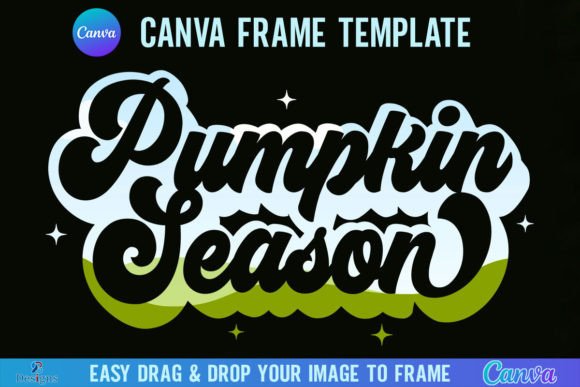
Visually, this template captures the quintessential "Pumpkin Season" vibe. It isn't just about placing a border around a photo; it is about framing a moment. The design style leans into the organic, rustic feel of autumn. Think of the visual personality as warm, inviting, and textured. It creates an immediate context for your subject matter.
The design works exceptionally well because it acts as a visual anchor. When you place an image inside the frame, the surrounding pumpkin elements provide scale and seasonal context without overpowering the subject. The style is versatile enough to work with both modern, high-contrast photography and softer, vintage-inspired edits. It avoids the trap of looking overly "cartoonish" or childish, maintaining a level of sophistication suitable for small business branding and serious design work.
Practical Application: How to Use the Frame
Using the Pumpkin Season Canva Frame Template is designed to be intuitive, even for those with limited design experience. The process relies on Canva’s user-friendly interface. You simply select the frame, navigate to your "Uploads" tab, and drag your preferred PNG or JPG image directly onto the frame. Canva automatically clips the image to fit the frame's boundaries.
This "drag and drop" functionality is a massive time-saver for marketers and social media managers who need to produce high volumes of content. Instead of manually erasing backgrounds or using complex clipping masks, the frame does the heavy lifting. This allows you to focus on the composition and the message rather than the technical execution of the cutout.
Strategic Uses for Creators and Businesses
The versatility of this asset extends across numerous projects. Here is how different professionals can leverage this template:
- Social Media Graphics: For Instagram, Facebook, or Pinterest, seasonal content is king. Use this frame to create cohesive carousel posts or story highlights that scream "autumn." It is excellent for promoting fall sales, seasonal menus, or cozy lifestyle content.
- Small Business Marketing: If you run a coffee shop, a boutique, or a landscaping service, consistent branding is crucial. Use the frame to wrap your product photography. It adds a layer of professionalism and shows that your brand is active and aware of the season.
- Blog Headers and Editorial Design: Bloggers can use the 4000x4000 px canvas to create stunning featured images. The high resolution ensures that even when cropped for a wide header, the details remain intact. It helps with visual hierarchy, drawing the reader's eye to the central image.
- Personal Projects and Crafting: For hobbyists, this is a great way to create digital scrapbook pages or printable wall art for the home. Since the file is digital, you can print it as many times as you like for personal use.
Navigating the Technical Requirements
Before you purchase, you need to be aware of the technical ecosystem required to use this product. First and foremost, you will need a FREE Canva account to open and edit the template. Canva is a browser-based platform, meaning you don't need to install heavy software like Adobe Photoshop or Illustrator to use this frame.
However, there is a specific limitation regarding output formats. If you intend to download the final design with a transparent background (for example, to overlay the pumpkin-framed image onto a different background color in another program), you must have a Canva Pro version or higher. The free version of Canva does not support transparent PNG exports. If you are using the free version, you will be working with a solid background color (typically white or whatever color you set on the canvas).
Compatibility and Limitations
It is crucial to understand what this product is not. This is a digital product; no physical frames will be shipped to you. Furthermore, while it is a versatile design asset, it is strictly a Canva Frame Template file only. It is not an SVG file, and it is not suitable for use with Cricut Design Space or Silhouette cutting machines.
If you are a crafter looking to cut physical shapes out of vinyl or cardstock using a plotter machine, this specific file format will not work for that purpose. It is designed for digital composition and print-on-demand (like posters or photo prints), not physical die-cutting. Keeping this distinction in mind ensures you get exactly the tool you need for your project type.
Maximizing the Value of Your Template
To get the most out of the Pumpkin Season Canva Frame Template, think about composition. Because the frame is square (4000x4000 px), it is inherently balanced. This makes it ideal for profile pictures, album covers, or square social media posts. When selecting the photo to place inside, consider images that have a clear focal point. Busy backgrounds might get lost behind the frame's decorative elements.
Also, consider the "Ungrouped" feature as your playground. If the standard layout feels too symmetrical, break the group apart. Move the pumpkin elements to the corners to create a diagonal flow, or stack them at the bottom to create a "ground" for your image. This flexibility transforms a single template into dozens of potential layouts. By combining this frame with other design assets available in Canva—like autumn-themed typography or texture overlays—you can build a rich, multi-layered visual narrative for your brand or personal project.
Ultimately, this template is about efficiency and seasonal relevance. It allows you to tap into the emotional resonance of autumn design without the steep learning curve of professional graphic design software. Whether you are a seasoned designer looking to speed up your workflow or a blogger