Daisy Canva Frame: Elevate Your Floral Designs
In the world of digital design, finding tools that offer both simplicity and professional results can feel like a constant search. The Daisy Canva Frame Daisy Flower Floral template is designed to bridge that gap. It’s a specialized asset that allows you to create polished, floral-themed graphics with minimal effort. This isn't just a static image file; it's a dynamic, editable template that integrates directly into your Canva workflow, providing a structured yet flexible starting point for a wide range of projects.
Understanding the Daisy Floral Frame Template
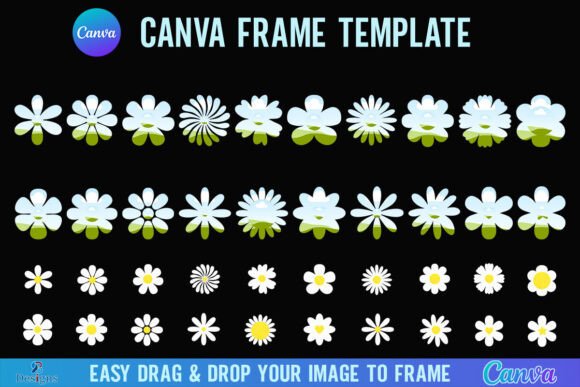
At its core, the Daisy Canva Frame is a pre-designed layout featuring elegant daisy motifs arranged as a decorative border. The visual style is clean, modern, and botanical. It avoids overly intricate or vintage aesthetics, instead offering a fresh, versatile look that feels both professional and approachable. The personality of this design asset is one of gentle sophistication—it’s perfect for projects that need to convey freshness, growth, beauty, or a connection to nature without feeling overly rustic or informal.
You receive the template as a simple, compressed package. Inside, you'll find a single PDF document. This file contains a direct link to the actual Canva template. Clicking that link will prompt you to open it within your Canva account, where it becomes a fully editable project. The frame itself is built on a generous 4000x4000 pixel canvas, making it suitable for high-resolution applications, from detailed social media graphics to physical prints. The process is intuitive: once inside Canva, you can easily drag and drop any PNG or JPG image into the frame area. The template automatically masks your photo within the daisy border, instantly creating a cohesive, framed image.
Practical Applications for Creators and Brands
The true value of a design asset like the Daisy Canva Frame lies in its adaptability across different contexts. For entrepreneurs and small business owners, this template can be a secret weapon for brand consistency. Imagine using it to frame product photos for an Instagram shop, creating uniform and eye-catching visuals that build brand recognition. It’s equally effective for bloggers and content creators who need to create consistent featured images for articles or Pinterest pins, establishing a recognizable visual style that audiences come to associate with their content.
For those involved in marketing and publishing, the frame offers a quick way to add professional polish. Use it to create elegant webinar announcements, podcast cover art, or digital magazine covers. Designers and hobbyists will find it invaluable for personal projects like creating custom wedding invitations, graduation announcements, or personalized gifts. The ability to simply drop in a photo of the recipient or a relevant image makes the process both personal and professional. It’s a versatile piece of design assets that supports both commercial and personal creativity.
Influence on Visual Communication and Branding
Consistent use of a specific visual element, like the floral frame from the Daisy Canva template, plays a significant role in shaping brand identity. This kind of repeated visual motif helps with audience recognition. When followers see your content, the daisy frame acts as a subtle signature, making your work instantly identifiable even before they read the caption or title. This contributes to a stronger, more cohesive brand identity across all your platforms.
From a design perspective, the frame creates a natural visual hierarchy. It draws the viewer's eye inward toward the central image you place within it. This can significantly improve readability and focus, especially when the framed image contains text or a key subject. The structured border provides a clear boundary, which helps in web design and social media graphics where content can often appear cluttered. It imposes a sense of order and intentionality, elevating a simple photo into a designed element.
Getting Started and Maximizing Your Use
To begin, you will need a free Canva account. This is all that's required to open, edit, and use the template. The process is straightforward: after downloading and unzipping your file, open the PDF, click the link, and start customizing. You can change colors, adjust the scale of the daisy elements, and add your own text directly onto the canvas surrounding the frame.
One important consideration is file export. If your project requires a transparent background—for instance, to layer the framed image onto a different background color or pattern in another software—you will need a Canva Pro subscription or higher. This feature allows you to download the design as a PNG with the background removed, giving you more flexibility in advanced compositions.
When evaluating if this template is the right fit for your project, consider the overall mood. The Daisy Canva Frame is ideal for themes of spring, wellness, beauty, weddings, gardening, and eco-friendly brands. It might be less suited for projects that require a dark, gritty, or ultra-minimalist aesthetic. For the best results, pair it with clean, modern sans serif fonts or elegant script fonts that complement its floral nature without competing for attention. The template is a creative font of sorts for imagery—it provides the stylistic frame, while you supply the core content.
This is a digital product; no physical items are shipped. Remember, it is a Canva template file and is not an SVG or a cut file for machines like Cricut or Silhouette. Its strength lies in its digital flexibility and ease of use within the Canva ecosystem. By integrating the Daisy Canva Frame into your workflow, you add a reliable, professional, and beautiful tool to your design assets library, helping you produce consistent, engaging visuals that resonate with your audience.