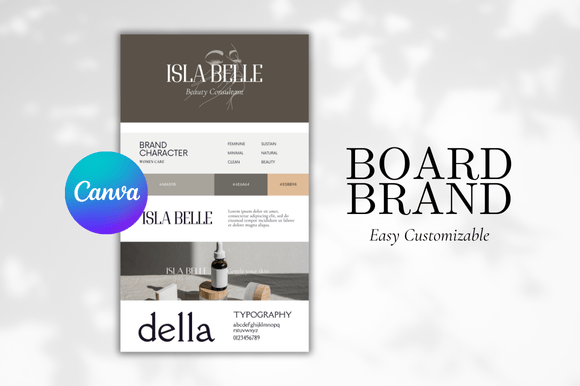
Brand Board Canva Template: Your Visual Blueprint
Building a brand that feels cohesive and intentional can feel like a puzzle. You have a logo, maybe some colors you like, and a font that seems right. But how do you see it all together? How do you ensure every social media post, every invoice, and every piece of marketing material looks like it belongs to the same family? This is the exact problem a Brand Board Canva Template solves. Think of it as your brand's visual instruction manual, all on one page.
What Exactly Is a Brand Board?
A brand board is a single-page document that showcases the core visual elements of your brand identity. It’s not just a mood board full of inspiration images. It’s the final, approved set of assets. A quality Brand Board Canva Template will typically include your primary logo, secondary logo variations, your full color palette with hex codes, your chosen typefaces (like a serif font for headings and a sans serif font for body text), patterns, textures, and example imagery or icons that define your style.
The real power lies in its application. For a small business owner or entrepreneur, this document becomes the north star for any designer or freelancer you hire. For a blogger or content creator, it ensures your Instagram grid, Pinterest pins, and blog graphics have that unmistakable, professional consistency that builds audience recognition. It transforms guesswork into a clear system.
Practical Applications: From Digital to Print
Where does a Brand Board Canva Template actually get used? Everywhere. Its utility spans across nearly every project a marketer, designer, or publisher might undertake.
- Social Media Graphics: With your brand board open in one tab, creating a week's worth of Instagram stories or LinkedIn posts becomes a streamlined process. You’re not hunting for the right shade of blue or the perfect script font for a quote—it’s all documented.
- Web Design & Editorial Layout: When briefing a web developer or laying out a digital magazine, the brand board provides exact specifications. This ensures your typography hierarchy on a website mirrors the feel of your printed brochures, creating a seamless brand identity.
- Packaging & Product Design: For crafters and those selling physical goods, the board guides label design, thank you card inserts, and box graphics. It guarantees the visual hierarchy on your packaging communicates the right message, whether it’s luxury, playful, or minimalist.
- Client Onboarding for Creatives: If you’re a freelance brand strategist or designer, delivering a Canva Branding Kit complete with a brand board is a game-changer. It elevates your professionalism and gives clients a tangible asset they can use immediately, which directly impacts their perception of your value.
Making It Work: Selection and Customization Tips
Choosing and implementing a Brand Board Canva Template requires a bit of strategy. First, evaluate the template's personality. Does its default style—be it modern, vintage, or bohemian—align with your project’s audience? A coquette aesthetic might work for a boutique, but not for a tech startup.
Next, consider font pairing. A great template will suggest complementary typefaces. Test them. Does the suggested display font for headlines actually grab attention without sacrificing readability? Does the body font remain clear at small sizes on a mobile screen? Your board should enhance, not hinder, communication.
Finally, think about your entire asset library. A single brand board is the core, but your Canva Branding Kit might expand to include templates for presentations, invoices, or social media graphics. Use the board as the foundation to build out these other design assets. The goal is a cohesive system where every touchpoint reinforces your brand perception, making you instantly recognizable and trusted by your audience.